You’re publishing content. You’ve read the SEO guides. You might have even hired a freelancer or agency at some point. And yet your website still isn’t showing up on Google — no meaningful traffic, no leads, no new customers from search.
If that sounds familiar, the problem usually isn’t a lack of effort. It’s that one or more foundational SEO mistakes are quietly blocking everything else you’re doing. After auditing websites across B2B, ecommerce, healthcare, and service-based industries, the same seven issues show up again and again.
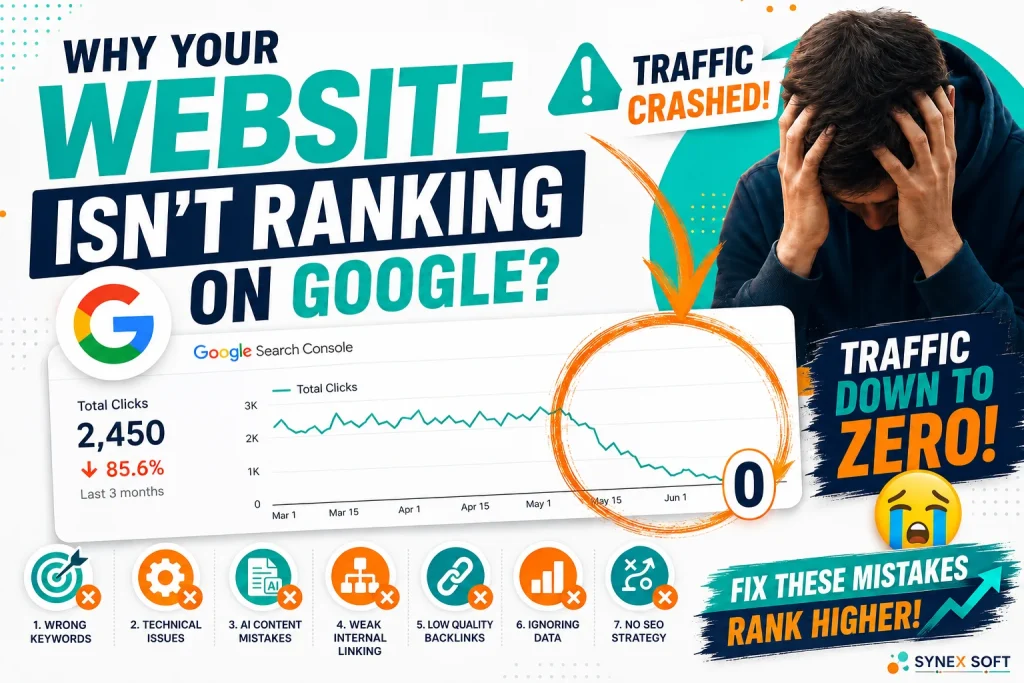
Quick answer: Most websites fail to rank because of a mix of the following: targeting the wrong keywords, unresolved technical SEO issues, careless use of AI-generated content, poor internal linking, low-quality backlinks, ignoring Google Search Console data, and having no documented SEO strategy. Fixing even two or three of these can meaningfully change your visibility within a few months.
This article breaks down each mistake, why it hurts your rankings, and what to do about it — based on the patterns seen across dozens of real website audits.
🎥 Watch the full breakdown on YouTube:
https://www.youtube.com/watch?v=5WmTkr1DlZk
1. Poor Keyword Targeting
Many websites are built around what the business wants to be known for, not what customers actually type into Google. That mismatch is one of the fastest ways to stay invisible.
Common versions of this mistake include:
- Targeting broad, high-competition keywords a smaller or newer site has little chance of ranking for
- Chasing search terms that sound relevant but get almost no real search volume
- Writing purely informational content while ignoring the commercial, buyer-intent keywords that actually bring customers
- Never mapping keywords to a specific page, so multiple pages compete against each other for the same term
The fix: Build a keyword map before you write anything. Group keywords by search intent (informational vs. commercial vs. navigational), assign each cluster to one target page, and prioritize terms your business can realistically compete for today — not the ones with the biggest search volume on paper.
2. Ignoring Technical SEO Until It’s Too Late
Technical SEO doesn’t get the attention content and keywords get, but it’s the layer everything else depends on. If Google can’t properly crawl, render, and index your pages, no amount of great content will help.
The most common technical issues found during audits include:
- Pages accidentally blocked by
robots.txtor a straynoindextag left over from development - Broken or conflicting canonical tags that confuse Google about which page to rank
- Slow load times and poor Core Web Vitals scores, especially on mobile
- Duplicate content across similar pages with no clear canonical signal
- JavaScript-heavy pages that don’t render properly for Google’s crawler
The fix: Run a crawl audit (Screaming Frog or a similar tool) alongside the Page Indexing report in Google Search Console. Fix indexing blockers first — they have zero-cost, high-impact returns since a page that isn’t indexed can never rank, no matter how good the content is.
3. The Right Way to Use AI for SEO
AI tools have made content production faster than ever, and that’s exactly where a lot of websites are getting hurt. Publishing large volumes of unedited, generic AI content is one of the newer mistakes showing up in audits.
This looks like:
- Publishing AI drafts with no fact-checking, editing, or original insight added
- Dozens of thin articles targeting near-identical keywords, cannibalizing each other
- Content with no first-hand experience, data, or point of view — the exact opposite of what search engines are trying to reward
- No human review process before publishing at scale
The fix: Use AI as a drafting and research assistant, not a publishing pipeline. Add original data, examples, screenshots, or expertise a generic model can’t produce on its own. The goal is content that demonstrates real experience — not just content that exists.
4. Internal Linking Mistakes
Internal links tell Google (and your visitors) which pages matter most and how your content relates to each other. Get this wrong, and you’re essentially hiding your best pages from search engines.
Frequent issues include:
- Orphan pages with no internal links pointing to them at all
- Important pages buried several clicks deep from the homepage
- Generic anchor text like “click here” instead of descriptive, keyword-relevant phrases
- No links between related content, so topical authority never builds
The fix: Map your site’s internal linking the same way you’d map a table of contents. Your most important pages (services, money pages, pillar content) should be reachable within two or three clicks from the homepage, with descriptive anchor text linking related articles together. [INTERNAL LINK: /services/seo-audit “professional SEO audit”]
5. Low-Quality Backlinks
Not all backlinks help — some actively damage your rankings. Businesses that chase link volume instead of link quality often end up worse off than if they’d built no links at all.
Red flags found during backlink audits:
- Links from unrelated, low-authority, or spam-flagged directories
- Paid link schemes that violate Google’s guidelines
- Reciprocal link farms with no editorial value
- A backlink profile that grew unnaturally fast in a short window
The fix: Audit your existing backlink profile using Google Search Console’s Links report or a third-party tool, and disavow anything clearly toxic. Going forward, prioritize a small number of relevant, earned links (guest posts, partnerships, digital PR) over large volumes of low-value ones.
6. Ignoring Google Search Console
Google Search Console is free, and it’s arguably the single most underused SEO tool on the market. Many site owners either never connect it, or connect it once and never look again.
What’s typically being missed:
- The Page Indexing report, which shows exactly which pages are excluded and why
- Search performance data revealing keywords you already rank for on page 2 — often the easiest wins available
- Core Web Vitals and mobile usability issues flagged directly by Google
- Manual actions or security issues that can silently tank rankings
The fix: Check Google Search Console at least monthly. Pay special attention to queries where you rank between positions 5–15 — these usually need only minor on-page improvements to move up significantly.
7. No Real SEO Strategy
This is the mistake that makes all the others more likely. Without a documented strategy, SEO becomes a series of disconnected actions — a blog post here, a backlink there — with no way to measure what’s actually working.
Signs a business is missing a real strategy:
- No clear target keywords tied to business goals
- Content published on an ad-hoc schedule with no topical plan
- No regular tracking of rankings, traffic, or conversions
- SEO treated as a one-time project instead of an ongoing process
The fix: Build a simple quarterly SEO plan: target keyword clusters, a content calendar tied to those clusters, a technical health checklist, and a monthly review of Search Console data. Consistency compounds — SEO rewards sites that show up reliably over months, not weeks.
It’s Rarely Just One Mistake
In most audits, a site isn’t failing because of a single issue — it’s a combination of two or three of the mistakes above stacking on top of each other. Weak keyword targeting plus thin internal linking, for example, or solid content sitting on a technically broken foundation. Identifying which combination applies to your site is the first step toward fixing it.
Frequently Asked Questions
Why isn’t my website ranking on Google even though I publish content regularly?
Publishing frequency doesn’t fix ranking issues caused by technical problems, poor keyword targeting, or a weak backlink profile. Content quality matters, but it has to sit on top of a technically sound, well-structured site to actually rank.
How long does it take for SEO fixes to show results?
Most technical fixes (like resolving indexing issues) can show movement within a few weeks. Keyword targeting, content, and authority-building changes typically take three to six months to fully reflect in rankings, depending on competition.
Can AI-generated content hurt my SEO?
Yes, if it’s published without editing, fact-checking, or added expertise. Google’s systems are increasingly good at identifying generic, low-value content regardless of whether a human or AI wrote it. AI is a useful drafting tool — it shouldn’t be the final step in your content process.
Do I actually need backlinks to rank on Google?
For most competitive keywords, yes — backlinks remain one of the strongest ranking signals. But quality matters far more than quantity. A handful of relevant, earned links outperforms hundreds of low-quality ones, and toxic links can actively hurt you.
What’s the fastest way to find out what’s wrong with my website’s SEO?
Start with Google Search Console’s Page Indexing and Search Performance reports — they’re free and reveal most technical and keyword issues immediately. For a full picture, a professional SEO audit will also assess backlinks, content quality, and internal linking structure.
Get a Professional SEO Audit
If your website isn’t getting the rankings or traffic it should, these seven mistakes are the first place to look. A proper audit will tell you exactly which ones apply to your site and in what order to fix them.
Request an SEO consultation through synex-soft.com to get a clear breakdown of the biggest opportunities to improve your organic visibility. You can also connect on LinkedIn for weekly SEO insights, live website audits, and real-world case studies.