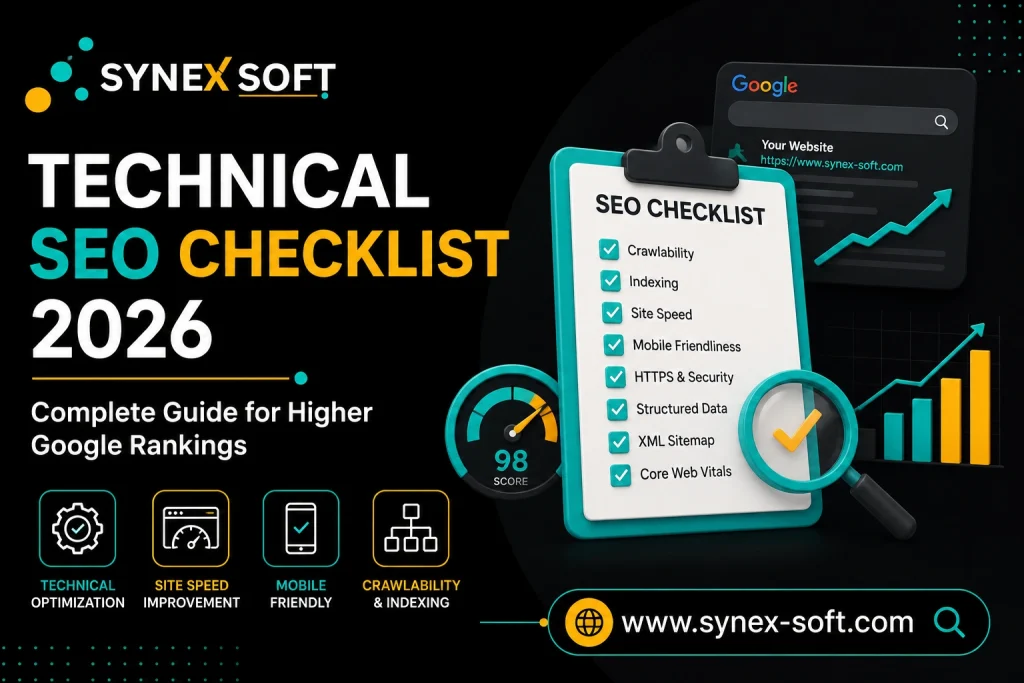
Technical SEO is the process of optimizing a website’s infrastructure so search engines can efficiently crawl, index, and rank its pages. It covers site architecture, crawlability, indexing, Core Web Vitals, mobile optimization, HTTPS security, schema markup, and AI search readiness. In 2026, technical SEO is foundational — even the best content will fail to rank if your website has unresolved technical issues blocking Google from properly accessing and understanding it.
🎬 Watch the full video tutorial: Technical SEO Checklist 2026 – Complete Technical SEO Guide
What Is Technical SEO?
Technical SEO refers to all behind-the-scenes optimizations that affect how search engines discover, crawl, render, and index your website. Unlike on-page SEO (content and keywords) or off-page SEO (backlinks), technical SEO focuses on the structural health of your site. Without it, crawlers may miss your pages entirely, index the wrong version of your content, or penalize you for slow load times and poor mobile experience.
Why Technical SEO Matters in 2026
Search engines in 2026 — including Google, and AI-powered tools like ChatGPT and Perplexity — rely on clean, well-structured websites to extract and serve information. Technical SEO directly impacts:
- Whether Google can crawl and discover your pages
- Whether pages get indexed and appear in search results
- Your Core Web Vitals scores and page experience signals
- How well your content is parsed by AI search engines
- Overall site architecture and link equity distribution
- User experience across mobile and desktop
Without solid technical SEO, your content never reaches its ranking potential — no matter how well it is written or optimized.
Complete Technical SEO Checklist for 2026
1. Website Crawlability Optimization
Crawlability is the foundation of technical SEO. If Googlebot cannot crawl your pages, nothing else matters.
- Audit your site with Google Search Console — check the Coverage report for crawl errors
- Use the URL Inspection Tool to test individual pages and see how Google renders them
- Ensure your site architecture is flat — important pages should be reachable within 3 clicks from the homepage
- Avoid crawl traps: infinite scroll, session IDs in URLs, and faceted navigation that generates thousands of duplicate URLs
- Check your server response codes — fix all 5xx errors immediately as they block crawling
2. Robots.txt Optimization
Your robots.txt file tells search engine crawlers which pages to access and which to skip.
- Ensure robots.txt is accessible at
yourdomain.com/robots.txt - Do not block CSS, JavaScript, or image files — Google needs to render your pages correctly
- Block pages that should never be indexed: admin panels, thank-you pages, duplicate filtered URLs
- Never block pages you want ranked — a common mistake that kills organic visibility overnight
- Add your XML sitemap URL inside robots.txt for easy discovery
User-agent: *
Disallow: /wp-admin/
Allow: /wp-admin/admin-ajax.php
Sitemap: https://yourdomain.com/sitemap.xml
3. XML Sitemap Setup and Optimization
An XML sitemap is a roadmap that helps Google find and prioritize your most important pages.
- Submit your sitemap to Google Search Console under the Sitemaps section
- Include only canonical, indexable URLs — exclude noindex pages, paginated archives, and thin content
- Keep sitemaps under 50,000 URLs — split into multiple sitemaps if your site is large
- Use a separate image sitemap to help Google index your visual content
- Update your sitemap automatically — most SEO plugins (Rank Math, Yoast) handle this, but verify it is refreshing on new content publication
4. Indexing Issues and Fixes
Google indexing a page is not guaranteed — and many pages are excluded for reasons you can fix.
Common indexing issues and solutions:
| Issue | Fix |
|---|---|
| Page marked “noindex” accidentally | Remove the noindex tag via plugin settings or meta robots |
| Soft 404 errors | Return proper 200 status or redirect to relevant content |
| Duplicate content indexed | Implement canonical tags (see Section 8) |
| Page not discovered | Add internal links pointing to it and submit via URL Inspection |
| Crawl budget wasted on low-value pages | Noindex or block tag/category archives, pagination |
Monitor the Pages report in Google Search Console regularly — it shows exactly why Google is or is not indexing each URL.
5. Core Web Vitals Optimization
Core Web Vitals are Google’s page experience metrics and a confirmed ranking factor. The three signals to target in 2026:
- LCP (Largest Contentful Paint) — should be under 2.5 seconds. Optimize by preloading hero images, using fast hosting, and removing render-blocking resources.
- INP (Interaction to Next Paint) — should be under 200 milliseconds. Reduce JavaScript execution time and minimize main thread blocking.
- CLS (Cumulative Layout Shift) — should be under 0.1. Set explicit width and height on images and embeds; avoid dynamically injected content above the fold.
Tools to use: Google PageSpeed Insights, Search Console Core Web Vitals report, GTmetrix.
6. Website Speed Optimization
Page speed affects both rankings and user experience. Slow pages lose visitors and lose rankings.
Key optimizations:
- Use a fast, reliable hosting provider — avoid shared hosting for serious sites
- Implement browser caching and server-side caching
- Enable GZIP or Brotli compression on your server
- Use a Content Delivery Network (CDN) to serve assets from servers closer to your users
- Minify CSS, JavaScript, and HTML
- Convert images to WebP format and enable lazy loading
- Eliminate unused CSS and JavaScript — audit with Chrome DevTools Coverage tab
- Defer non-critical scripts and use
asyncfor third-party tags
Target a PageSpeed Insights score of 90+ on both mobile and desktop.
7. Mobile-First SEO
Google uses mobile-first indexing — the mobile version of your site is what Google crawls and uses for ranking.
- Use a responsive design that adapts to all screen sizes
- Ensure all content visible on desktop is also present on mobile
- Font sizes should be readable without zooming (minimum 16px body text)
- Tap targets (buttons, links) should be at least 48px in size with adequate spacing
- Test your site with Google’s Mobile-Friendly Test and the Search Console Mobile Usability report
- Avoid interstitials and pop-ups that cover content on mobile — Google penalizes intrusive interstitials
8. HTTPS and Website Security
HTTPS is a direct Google ranking signal and a trust factor for users.
- Install an SSL certificate and enforce HTTPS across the entire site
- Set up 301 redirects from all HTTP URLs to their HTTPS equivalents
- Ensure internal links use HTTPS URLs — mixed content warnings harm user trust
- Check for mixed content errors (HTTP resources loaded on HTTPS pages) using browser DevTools or Screaming Frog
- Keep your CMS, plugins, and themes updated — security vulnerabilities can lead to hacking and Google blacklisting
9. Canonical Tags
Canonical tags tell Google which version of a page is the “master” version when duplicate or similar content exists across multiple URLs.
- Add a
rel="canonical"tag on every page pointing to its preferred URL - Use canonicals to consolidate duplicate product pages, filtered URLs, and paginated content
- Ensure canonicals are self-referencing on original pages — not pointing to a different URL unintentionally
- Check for conflicting signals: a page marked canonical should not also be set to noindex
- Verify canonicals using the URL Inspection Tool in Google Search Console
<link rel="canonical" href="https://yourdomain.com/technical-seo-checklist/" />
10. Internal Linking Strategy
Internal links distribute crawl budget and page authority across your site, and help Google understand topical relationships.
- Create content clusters: a pillar page (broad topic) supported by cluster pages (subtopics), all interlinked
- Use descriptive, keyword-rich anchor text — avoid generic anchors like “click here”
- Link from high-authority pages (homepage, top-ranking articles) to pages you want to boost
- Fix orphan pages — pages with no internal links pointing to them will rarely get crawled or ranked
- Aim for 3–5 relevant internal links per article
- Audit internal links regularly with Screaming Frog or Google Search Console
11. Broken Links and 404 Errors
Broken links waste crawl budget, harm user experience, and signal poor site maintenance to Google.
- Crawl your site monthly with Screaming Frog or Ahrefs Site Audit to find all broken links
- Fix internal broken links by updating the URL or removing the link
- Set up 301 redirects for deleted or moved pages — never leave a formerly ranking page returning 404
- Create a custom 404 page that helps users navigate back to live content
- Check the Coverage report in Search Console for “Not Found” errors reported by Google
12. Schema Markup (Structured Data)
Schema markup helps search engines understand your content type and enables rich results in SERPs.
- Add Article schema to all blog posts and guides
- Implement FAQ schema on pages with question-and-answer sections — these appear as expandable results
- Use HowTo schema for step-by-step tutorial content
- Add Organization schema to your homepage with your name, logo, and contact info
- Implement BreadcrumbList schema for site-wide navigation clarity
- Validate all structured data with Google’s Rich Results Test before and after publishing
Schema also improves your chances of appearing in Google AI Overviews — AI systems use structured data to identify and extract authoritative information.
Technical SEO Tools Referenced in This Guide
| Tool | Purpose |
|---|---|
| Google Search Console | Crawl errors, indexing status, Core Web Vitals, sitemap submission |
| Google PageSpeed Insights | Page speed scores, Core Web Vitals field data |
| GTmetrix | Waterfall analysis, speed optimization recommendations |
| Screaming Frog SEO Spider | Full site crawl, broken links, redirect chains, canonical audit |
| Chrome DevTools | Mixed content, JavaScript coverage, rendering issues |
Final Technical SEO Checklist (Quick Reference)
| Technical SEO Element | Status |
|---|---|
| Robots.txt properly configured | ✔ |
| XML sitemap submitted to Search Console | ✔ |
| Indexing issues identified and fixed | ✔ |
| Core Web Vitals passing (LCP, INP, CLS) | ✔ |
| Page speed optimized (90+ PageSpeed score) | ✔ |
| Mobile-first design verified | ✔ |
| HTTPS enforced site-wide | ✔ |
| Canonical tags on all pages | ✔ |
| Internal linking structure in place | ✔ |
| Broken links and 404 errors resolved | ✔ |
| Schema markup implemented and validated | ✔ |
| Crawlability confirmed via URL Inspection | ✔ |
Watch the Full Video Tutorial
This guide covers every element of the checklist, but the video walkthrough shows you exactly how to find and fix these issues on a real website. Watch it here:
▶ Technical SEO Checklist 2026 – Complete Technical SEO Guide for Higher Google Rankings
Published by Synex-Soft | IT Services & Digital Solutions